Showing posts with label iphone. Show all posts

How To control Any PC Anywhere On Smartphone Using The TeamViewer apk 7.0.238

jillela chandrashekhar 1 Comment
To control Your PC Anywhere On Your Smartphone  Using The TeamViewer 


Download the TeamViewer App on play store and download TeamViewer software for pc


open the TeamViewer software on pc 

open TeamViewer app 

Enter the  TeamViewer  patnar ID "xxxxxxxxxx" 
given the TeamViewer  software 


Enter the password  XXXXXX

click OK

You can control your PC anywhere


5 Photo & Video Essential Apps In Iphone

jillela chandrashekhar
 Turn photos into striking works of art to share


Thanks to your iPhone there’s no danger that you’ll miss a photo (or video) opportunity. The built-in Camera app enables you to focus on your subject matter and capture a decent exposure, but there will be occasions when you may want to produce more creative-looking results. One of our essential apps enables you to turn photos into striking works of art that you can share with a huge community, so you can impress your friends with your apparent artistic skills. Another one mimics the amazing colours and tones of toy cameras, turning ordinary snapshots into extraordinary retro images with attractive borders. If you prefer to shoot videos, experiment with quick fire creations like Vine and Kscope, that enable you to shoot six-second videos. If you prefer to watch rather than create videos, YouTube has been given a makeover and a whole host of new features for you to enjoy.

1.Snapseed

􀁑Snapseed has all the fun photo filters of other apps but
also some serious tweaks for users to work with snapseed.

Price: Free
Developer: Nik Software

Many people will say that this is the best photo editing app available on iOS, and it is hard to disagree. Snapseed contains a great mixture of light-hearted filters and serious tweaks, as well as an attractive and easy to use interface.

2.KODAK Kiosk Connect App

􀀃Wirelessly print your pictures from your APPLE iOS
 Device to a KODAK Picture kiosk.

Price: Free
Developer: Kodak Alaris

This app lets you connect your iPhone wirelessly to your nearest KODAK Picture Kiosk and print out your photos. Ideal if you like spending time with your friends out and about around town and want to savor those moments.

3.YouTube
􀀃There is no end to the
entertainment with YouTube.

Price: Free
Developer: Google, Inc

Watch videos from one of the world’s most popular websites with this official download. For endless entertainment, subscribe to your favorite channels, create a Watch Later list for when you don’t have time, or even watch videos while searching for the next one. 

4.Instagram

􀀃Instagram is still
the one to beat .

Price: Free
Developer: Burbn, Inc

The fact that Instagram now has over 80 million users is a testament to just how good it is. Capture a photo or select one from your Camera Roll before adding custom filters. You can then share the image to the community or other social networks.

5.Kscope
􀀃Create kaleidoscopic videos and still
photographs with Kscope

Price: Free 
Developer:Bond & Coyne

Create Kaleidoscopic photos and videos with this arty app. There are five filters to experiment with to create crazy patterns, but the app also responds to surroundings, light, movement. Share creations on Twitter and Facebook.

How To Jailbreak ios 7

jillela chandrashekhar
Access new tricks and functions by jailbreaking your iPhone

While iOS 7 fulfils the day-to-day requirements of most people, there is a community of users who look to further enhance the experience by jailbreaking.

This involves unlocking the iOS operating system – a simple process, which then grants you access to the Cydia app store. From here you can download apps that perform functions not normally possible within iOS. Examples include adding a newsfeed to your Lock screen or using face recognition to unlock your device. Jailbreaking your iPhone is as simple as connecting your handset to a computer. Over the next few steps we’ll look at the process of obtaining what is known as an un-tethered jailbreak. It’s recommended that you back up your iPhone beforehand, either via iCloud or iTunes. At the time of writing, jailbreaking can only be done on handsets with an installed iOS version earlier than 7.1. If you previously upgraded to iOS 7 via an over-the-air update (as opposed to via iTunes), there is also a good chance that the jailbreak will not take effect. If this is the case, sadly you won’t be able to jailbreak your device.

1: Download Evasi0n
Go to http://evasi0n.com in a desktop web browser. Select the download link for your operating system. Be sure to check the ‘Read Me’ section lower down the webpage.

“You can download all kinds of apps that perform functions not normally possible”

2: Prepare your device

open the Evasi0n app to prepare 


It’s good practice to charge your iPhone before performing a jailbreak. You’ll also need to disable the pass lock via Settings>Touch ID & Pass code for the jailbreak to work.

3: Back up with iTunes


Open iTunes on your computer; update it but don’t update the iPhone itself. Connect your iPhone and create a backup. If something goes wrong, at least your data will be safe.

4: Start jailbreaking


Once you’re backed up, disconnect your iPhone and close iTunes. Open Evasi0n and connect your device again. Evasi0n will then confirm whether it can be jailbroken.

5: The jailbreak process


Click on Jailbreak to start the process. It can take a while and involves a few prompts and reboots during the process. Do not reopen iTunes at this stage.

6: Cydia app installed


Once finished, the phone will reboot and Evasi0n will display an exit prompt. A Cydia icon will appear on your Home screen once everything has been finalized.


Create A Blog With Tumblr In Iphones

jillela chandrashekhar 1 Comment
We quickly showcase how to use Tumblr to set up your blog

tumblr

These days you have a plethora of social platforms through which you can post your innermost thoughts and opinions. There’s Facebook, Twitter, Blogger and WordPress based sites, to name a few. All of these have their own pros and cons, however. Facebook is more of a friends-only affair, unless you create a page to go alongside this, but then you have the hassle of managing your private and public posts. Twitter is limited to only 140 characters per post, whereas WordPress sites can be time-consuming to manage. Fortunately, Tumblr offers a best-of-both-worlds scenario, in that it sort of acts like Facebook/Twitter, so you can follow other users and get updates in real-time, but you also get more characters to play with when posting your thoughts. As well as that, you can add extra multimedia material in the form of videos, photos, quotes and even chat through the service.
 In the following tutorial we will showcase how to create and manage your blog so you can start expressing yourself.

download and open the Tumblr app


1. Sign up and create user

Tap on the Account icon at the bottom of the screen and choose Sign Up. Select the camera icon to add a photo for your profile, then return to key in a username. 

2. Who to follow


Back at the main screen, you can tap Search to search for other users and then tap the Follow icon to add them to your list. Tap Account to see who you are following.

3. Adding a post


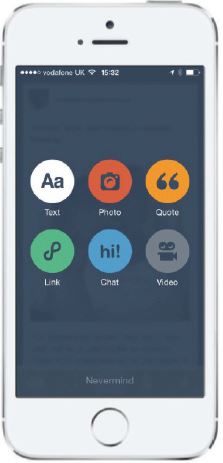
Tap the pencil icon to select something new to post. Options include Text, Photo, Quote, Link, Chat and Video. Tap Text then key in a title and the main body text.

4. Adding tags


Tap the tag symbol and enter a suitable term, then select the tag from the list. Repeat as necessary. Tags help others find your content and are very useful.

5. Post or schedule


Tap Post at the top to save, or tap the Settings icon. Here you can opt whether to post now or schedule it to go live at a later time, which is good to keep activity up if you are away.

6. Deleting/managing posts


From the main menu, tap Account> Username. You can select existing/queued posts. To delete posts, tap the bin; or use the pencil icon to edit.

using the Tumblr to post in your blog easily..